Showing posts with label Search Strategy. Show all posts

Friday, October 21, 2011

Searching with Google

Most people when they need to find something online turn to their favorite search engines for answers. This often means Google and sometimes Bing or Yahoo. These are massive search engines that give you thousands of results, far too many to go through. What ends up happening is you look at only the first couple of pages hoping that something useful is there. However, if you know a little something about searching you can get those useful results closer to the top of the list.

Think carefully about the subject you are trying to find information on and come up with a sentence that describes what you want.
Click for larger image.

 Pick out the 2-3 fact carrying words from that sentence to use in your search. 
Look at the difference in the first results.

If you get few (good) results try re-thinking your words. One of the words you picked might not be the one most used by people writing on the subject. From your results find out how most people write about your topic and use their words. You might have to do several searches until you get the right combination.

Now, on to what you actually type. You can get better results by using certain symbols to limit or broaden your search. Let’s look at Google.

When Google does a search it looks not only for your word but for plurals and synonyms. If you do a search for the words nurse and school you will get results for nurse, nursing, nurses, school, and schools.
If you want to stop it from looking for all those other words put a + sign in front of the word, like +nurse and you won’t get all the similar terms.

If you do want it to look for similar and related terms you can put a ~ sign in front of the word, like ~school. Doing this will get you results for not just school, schools, and schooling, but also academy, teacher, and institute.

Search engines don’t generally look for what are called “stop words”. These are common words like and, a, the, but, or. If you want to look for them in a phrase, or if you want to look up words in a specific order, put quotations around your phrase. “And that’s all” will give you that exact phrase. If you search for it without the quotation marks you won’t get the “and” and “that’s” and “all” will be out of order.

If you want to find two words near each other separate them with AROUND(5) which will make sure they are within 5 words of each other. It might look like, storm AROUND(5) damage.

You can combine all these things, like ~storm AROUND(5) +damage. Try ~storm ~damage. Try different words and combinations to see what you get.


When you get the results Google gives you further options to the left side to narrow things down. You can search for images, videos, news, blogs, and more. You can narrow your search to a certain time period, say the last year, or create your own custom date range to only look for things in the last five years. There are other things you can do, like look for translated pages or related searches. You can play with them if you want but the most useful might be the Not Yet Visited option so you can exclude websites you’ve already looked at.

You can also use the Advanced Search Screen to better organize your thoughts.


As a search tip remember that, especially with medical related topics, there is always an organization, foundation, council, or association and their websites are great sources of information. Look over the website to make sure they aren’t trying to push a specific viewpoint. Always ask the questions: Who is paying for this? Who benefits? Why do they exist?  MedlinePlus is a great place to find legitimate associations and foundations.

Wednesday, July 20, 2011

Abstracts

A brief word about abstracts. Articles often have a summary of their contents on the same page where the rest of the metadata is shown. This is called an abstract and it is an important tool for deciding whether an article is worth reading.

Abstracts are written by someone other than the article's author. There are companies that provide this service so the finished product tends to be objective and concise. 99% of the time the abstract is going to be the first piece of information you see. Since it contains the important points from the article, reading it will tell you if this is something you can use.

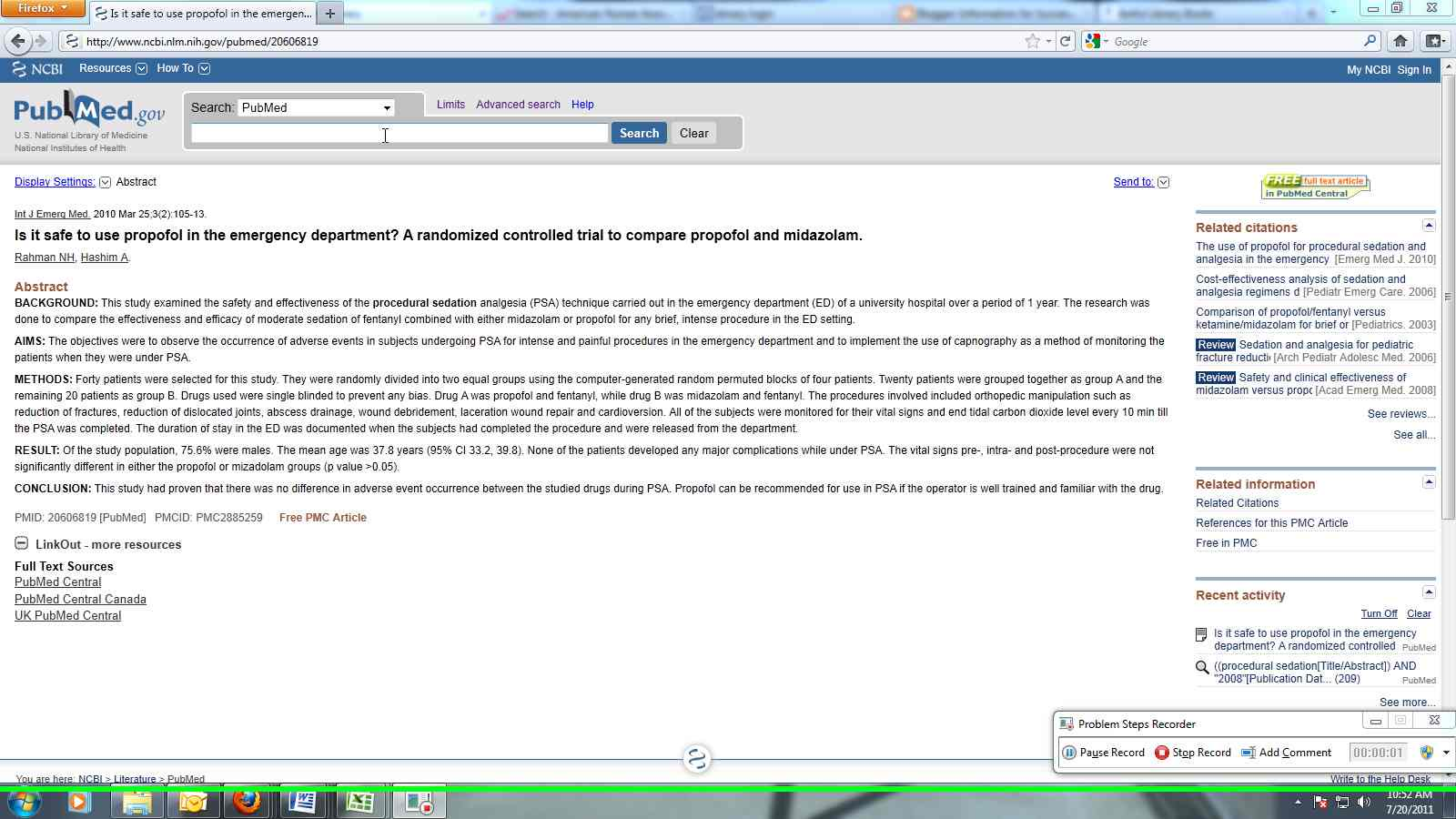
There are different types of abstracts that summarize in different ways and to a different depth. Most articles just have a brief synopsis of the contents but if the article is reporting the findings of a trial or study then you will get the background, aims, methods, results, and conclusions that they found. Let's take a look at a couple abstracts.

This is an abstract of a study article on PubMed.
This is a brief abstract on PubMed.
Look at the difference between these two. The first gives the essential information about the study that was done, including the methods used. The second gives an outline of what the article is talking about.

Rather than searching the entire text of an article for a word or phrase you can often choose to search only the abstract or title/abstract for your keywords.  Let's say you're looking for an article about the importance of influenza vaccinations. You search for the phrase "influenza vaccinations" and get 50 articles. You look through them and find out that 25 of these articles are about something else entirely and only mention your phrase in passing. The articles that are about influenza vaccinations probably have that phrase in their abstract since it's an important part of the content. That's why you want to look for it there rather than in the text.
So you re-do your search to find the phrase in the abstract and you get 25 results. You can read the abstracts before you look through the entire article to decide which one best fits what you need.

That's not to say you should never do a keyword search in the text. An article may not be about your topic but it might have an important chunk of information about what you need. Also you can combine searching for a keyword in the text with searching for a phrase in the abstract to get even better results. Not all articles have abstracts either.

Reading abstracts is also a good way to learn how to summarize. That's basically what an abstract is anyway; a summary of the article's contents. Read the abstract, read the article, and then read the abstract again to get an idea about how the person who wrote the abstract summarized the article's contents.

Friday, July 1, 2011

A general guide to searching effectively

In order to get the most out of your searches it's necessary to have a good strategy. Generally it's a good idea to look for two-three really good articles rather than trying to find a whole bunch. You don't want to overwhelm yourself. Too much information can be as difficult as too little.

First, write one sentence that lays out what exactly it is you are going to be looking for. What specifically do you want to know? Do you need a basic overview of the subject or something in depth? Are you interested in a sub-area of your topic? How much information do you want?
Next, make a list of what you know about the topic; key words and phrases, dates, people, places. Look at this and see if any obvious questions pop up. What don't you know? This will be the information you're looking for.

Next do your pre-research. Get a better grasp of the topic, pick out more pertinent words to use in your search. Wikipedia, The Merck Manual, and MedlinePlus are good places to start. Now, write down the words you are going to be searching with and in what combination. Remember the different fields on the Google Scholar advanced search page? What words would you put in the AND, OR, NOT, and proximity boxes? What limiters might you use? Maybe you only need one field but it's important to know which one you need.
If you think about all of this and write down what you're going to do before hand it makes the actual search less chaotic and frustrating.

Next it's time for the search. Go to a reliable database that's likely to have information on your subject. PubMed, Medscape, American Journal of Nursing, or any of the other journals listed on the catalog links page are useful resources for articles. Google Scholar is also a good place to go for any subject.

Start with a simple search just to see how many results you get and what sorts of articles you're getting. If you find what you want right away then congratulations! If not, and you don't feel like paging through 5,000 results then move on to the advanced search page.
Were there any subjects in your results that you aren't interested in? Write those words down and use them in the NOT field. (I know it might feel a little silly to write all this stuff down but it gives you a clearer idea of what you're doing and lets you keep track of what you've already tried. Plus, if you need to repeat a successful search you'll already have all the steps written down.) Make your search using the fields and limiters and see what you get.

If you're still getting a lot of irrelevant results, look through the hits that look useful and use the words in them to create a new search. Certain areas of study use buzz words for particular topics. These will appear in more than a few articles and are good search terms. Keep narrowing things down by using the new words you find with the words you were using. Keep note of which ones got you the best results and in what combination.

When you find something you want to use write down the citation information, where it's located, and what search you used to find it. The most frustrating thing is to find something and then lose it and be unable to remember how you found it to begin with.

After conducting a few successful searches you'll get the hang of spotting the terms best used and the whole process will be a lot quicker.